
Last Updated: October 2026 | All plan details checked on Weblium’s official pricing page, Help Center, Terms of Use and affiliate program page.
Content Outline
Key Takeaways
- Weblium has three plans: Free, Starter (11 USD/month billed yearly, 16 USD monthly) and Business (17.5 USD/month billed yearly, 25 USD monthly).
- The free plan is a test drive, not a forever plan: free sites can’t connect a domain or be indexed by Google, and they are blocked 60 days after creation (14-day trial plus 46 free days) unless you upgrade.
- The online store, blog and multilingual sites are only on Business. Starter is for lead-generation sites with up to 10 pages.
- Every annual plan includes a free domain for the first year, and each subscription covers one website.
- Refunds: the Terms of Use give you 14 days from purchase to ask for your money back.
- Affiliates can join Weblium’s program on Awin, with tiered commissions, 120-day tracking and payouts on the 1st and 15th.
Is Weblium a good website builder in 2026? For a small business, restaurant or portfolio site that needs to look professional without a developer, yes: it is one of the cheaper drag-and-drop builders, with paid plans from 11 USD a month on yearly billing and a free domain for the first year. The catch is the free plan. It only lasts 60 days, and a free site is never indexed by search engines, so you will need to pay before the site does anything for your business. This Weblium review covers current pricing, what each plan unlocks, the trial rules, where Weblium falls short, and how its affiliate program works if you want to promote it.
What Is Weblium?
Weblium is a hosted, do-it-yourself website builder. You pick one of its 300+ templates, edit pages block by block in a visual editor, and publish to Weblium’s hosting on Google Cloud with a free SSL certificate. There is nothing to install and no plugins to maintain, which is the main reason people choose it over WordPress.
Weblium also runs a few related services: Draftium (a website prototyping tool whose prototypes can be exported to Weblium), Weblium Studio (a done-for-you design team, with turnkey sites starting at 300 USD), and a white-label builder for agencies starting at 48 USD a month.
The free start needs no credit card, so you can test the editor before you decide on a plan.
Weblium Pricing 2026
Weblium prices each website separately. Yearly billing saves about 30% over paying monthly, and multi-site bundles (5, 10 or 15 sites) save 25–40%.
| Plan | Yearly billing | Monthly billing | Pages per site | Storage / bandwidth | Best for |
|---|---|---|---|---|---|
| Free | 0 USD (60 days) | 0 USD (60 days) | Up to 3 | 100 MB / 100 MB | Building a draft before you pay |
| Starter | 11 USD/mo (132 USD/yr) | 16 USD/mo | Up to 10 | 3 GB / 5 GB | Business sites and lead generation |
| Business | 17.5 USD/mo (210 USD/yr) | 25 USD/mo | Up to 500 | 10 GB / 20 GB | Online stores, blogs, multilingual sites |
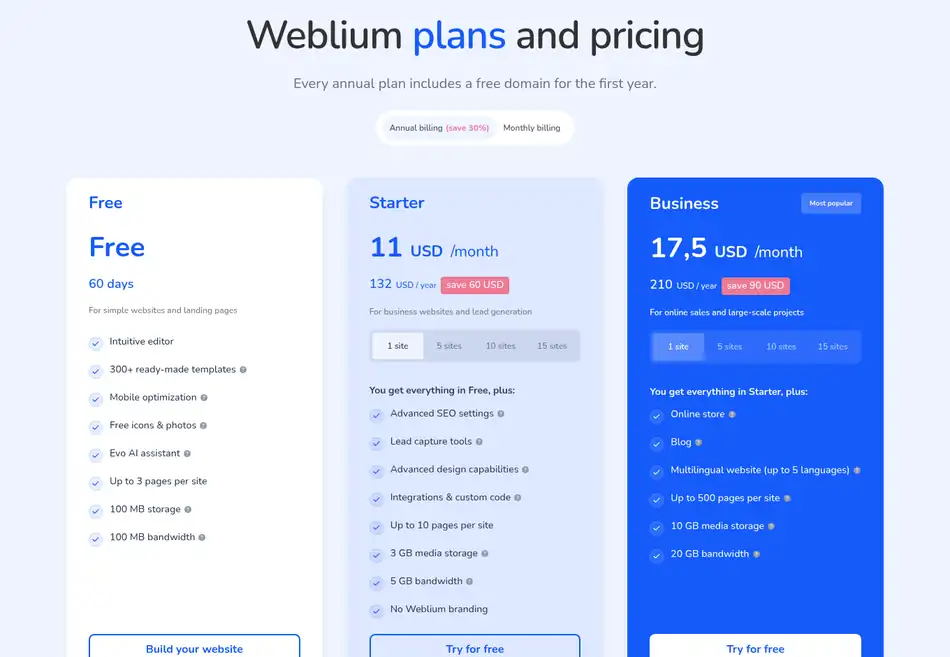
Prices are in USD and you can pay by Visa, Mastercard or PayPal. Annual plans include a free domain for the first year (the available extensions depend on the plan) and renew automatically unless you turn auto-renewal off. If a renewal payment fails, paid features stay on for 5 days while Weblium retries; after that the site drops to the Free plan.
What each plan adds
- Free: the editor, 300+ templates, mobile optimization, free icons and photos, and the Evo AI assistant, on a
subdomain.weblium.siteaddress. - Starter: everything in Free plus a custom domain, search engine indexing, advanced SEO settings, lead-capture tools (forms, quizzes, calculators), integrations and custom code, no Weblium branding, and 10 saved versions of your site.
- Business: everything in Starter plus the online store (up to 10,000 products, online payments, shipping and customer email notifications), a blog, multilingual sites in up to 5 languages, and 100 saved versions.
The Free Plan and 14-Day Trial: Read This First
Older reviews, including the first version of this one, described Weblium’s free plan as free forever. That is no longer true. According to Weblium’s Help Center (updated July 2026), every new site starts with a 14-day trial of some Business features, then stays on the Free plan for 46 more days. If you don’t upgrade, the site is blocked for visitors, and the data is kept for another 60 days before it is deleted. You can hold up to three free sites in one account.
Two limits matter more than the time limit:
- Free and trial sites are not indexed by Google or other search engines, and you can’t connect your own domain.
- Contact forms, custom code, pop-ups, chat widgets, integrations and links to external websites are switched off on the Free plan. During the trial, form replies arrive encrypted and only become readable after you buy a plan.
So treat the free period as time to design the site, then pick Starter or Business before you launch.
Key Features
Editor and templates
The editor works with ready-made blocks (headers, galleries, menus, pricing tables, contact sections) that you stack and restyle. Global color palettes and font pairings apply across the whole site, so changing a brand color does not mean recoloring every block. Every site gets automatic mobile and tablet versions, and the Flex block on paid plans gives more control over layouts. Templates cover small business, restaurants, education, real estate, portfolios, CVs, events and more.
Evo AI assistant
Evo is Weblium’s built-in AI assistant and is included on every plan, including Free. Use it for first drafts of page copy and layout ideas, then edit the result yourself.
Online store and CRM
The old version of this review said Weblium had no e-commerce and no CRM. Both claims are out of date. The Business plan includes an online store with up to 10,000 products, digital products, product import from other platforms, Google and Meta product feeds, online payments and shipping. Paid plans also include a built-in CRM that collects leads from your contact forms, quizzes and calculators.
SEO tools
Paid plans cover the SEO basics: meta tags, H1–H3 headings, image alt text, 301 redirects, custom 404 pages, canonical links, Schema.org markup, an auto-generated robots.txt and sitemap, and nofollow tags for external links. That is enough for a local business site. It is not a full content platform, so heavy bloggers will still be better off elsewhere.
Support
Weblium advertises 24/7 support through on-site chat, email and messengers, plus a Help Center with guides. Support is included on every plan.
If you are unsure, start on the trial: it shows the Business features, so you can see whether you need the store and blog before you pay.
Who Should Use Weblium?
- Good fit: small businesses, restaurants, consultants and freelancers who want a polished site of up to 10 pages on Starter, without hiring a developer.
- Good fit: small shops that want a store, a blog and multiple languages in one plan for 210 USD a year.
- Poor fit: anyone hoping to run a real site for free, because free sites are not indexed and expire after 60 days.
- Poor fit: content-heavy blogs and course creators. Course and membership businesses are better served by a dedicated platform; see these Kajabi sites we checked or an all-in-one tool like Systeme.io, which bundles a site builder with funnels and email.
How to Get Started with Weblium
- Sign up for free at weblium.com; no card is needed.
- Pick a template close to your business type, or start from blank blocks.
- Set your site style (colors and fonts) first, then edit pages and replace the demo content.
- Use the 14-day trial to test the store, blog, pop-ups and integrations you think you need.
- Choose Starter or Business, connect your domain (free for the first year on annual plans) and publish.
- Turn on indexing and fill in page titles, descriptions and alt text before you promote the site.
Refunds and Cancellation
Weblium’s Terms of Use allow a refund request within 14 days of purchase if you are not satisfied. If Weblium registered a domain for you, it may deduct the domain price, or you can ask to keep the domain. Refunds don’t apply to accounts that broke the content guidelines. To cancel, contact support; Weblium says it closes the account within one working day. Note that Weblium’s affiliate page mentions a 30-day money-back window, but the Terms of Use say 14 days, so plan around 14.
Weblium Pros and Cons
Pros
- Cheap paid plans: 11 USD/month for Starter on yearly billing
- Free domain for the first year on annual plans
- 300+ templates with automatic mobile versions
- Store, blog, CRM and multilingual sites included on Business
- Solid built-in SEO settings on paid plans
- No card needed to start the trial
Cons
- Free sites are blocked after 60 days and never indexed
- Store and blog need the Business plan
- Starter is capped at 10 pages per site
- Each website needs its own subscription
- Refund window is only 14 days
Weblium Affiliate Program
If you run a site about web design, small business or online marketing, Weblium is easy to promote because the entry price is low. The program runs on the Awin network (see our guide to affiliate networks for SaaS for how Awin compares). According to Weblium’s affiliate page:
- You earn a commission every time a referred customer buys a new paid subscription, with no cap on earnings.
- Rates rise as you sell more. Weblium shows the tiers on a chart topping out at 50% but does not publish the sales thresholds in text.
- Each referral is tracked for 120 days through cookies and tracking pixels.
- Commissions can only be withdrawn after a 30-day refund-check window; Awin pays on the 1st and 15th of each month.
- Joining is free, one application covers all your websites, and approved partners get banners, coupon codes and a personal manager.
If you prefer recurring income across several tools, compare it with these recurring affiliate programs.
FAQs
Only for a short time. A new Weblium site gets a 14-day trial and then 46 days on the Free plan, 60 days in total. Free sites can’t use a custom domain and aren’t indexed by search engines, and they are blocked if you don’t upgrade.
Weblium Starter costs 11 USD a month billed yearly (132 USD) or 16 USD month to month. Business costs 17.5 USD a month billed yearly (210 USD) or 25 USD month to month.
Yes, on the Business plan. Weblium’s store supports up to 10,000 products, digital products, online payments, shipping and customer notifications. Starter and Free do not include the store.
Yes, every annual Weblium plan includes a free domain for the first year. The offer is tied to annual billing, and the free extensions available depend on the plan.
Weblium’s Terms of Use let you request a refund within 14 days of purchase. If Weblium bought a domain for you, it may deduct the domain cost from the refund.
Weblium pays a tiered commission on each new paid subscription through Awin, with a chart showing rates up to 50%. Referrals are tracked for 120 days and payouts go out on the 1st and 15th.
Conclusion: Is Weblium Worth It?
Weblium is worth it if you want a clean, mobile-ready business site for about 132 USD a year, or a small store with a blog for 210 USD a year, and you don’t want to manage hosting or plugins. Don’t judge it by the free plan, which is only a 60-day sandbox that search engines never see. Build your draft on the trial, then move to Starter for a lead-generation site or Business if you need to sell.