
Last Updated: November 2026
I keep an Omnisend tab open when I need email, SMS, and web push for an ecommerce store in one login. In this Omnisend review I will walk you through how the product is sold in 2026, the features I actually care about, official Omnisend pricing, and whether Omnisend is worth it for a Shopify or WooCommerce shop. I am writing this as Jitendra Vaswani, from the point of view of someone who has to pick a tool and live with the bill.
The short answer is yes if you run an online store and want pre-built automations without a heavy platform fee on day one. The Free plan costs $0, needs no credit card, and lets you send 500 emails a month to up to 250 contacts. Paid Standard plans start at $16 a month. Pro starts at $59 a month and is the plan you need if you want SMS.
I would not jump to Pro on a tiny list just to have text messaging on day one. New accounts can add SMS only on Pro, and those credits are a separate add-on. If you are still testing flows, start on the Free plan and read the plan limits first.

Omnisend is a strong pick for ecommerce email in 2026 if you want a real Free plan, pre-built automations, and room to add SMS later. Paid plans start at $16 a month, and I would only move to Pro when I need unlimited email or SMS.
Pros
- A genuine Free plan with 500 emails, 250 contacts, and no credit card
- Email, web push, and (on Pro) SMS can live in one automation workflow, with Shopify and WooCommerce connections
- Standard starts at $16 a month, and first-time paid users can take 30% off for three months when they pay upfront
Cons
- New accounts can buy SMS only on Pro, and SMS credits are a separate add-on
- Billing counts subscribers and non-subscribers who receive automations, so the bill can rise even when marketing opt-ins stay flat
Price: From $16 /mo
Buy Now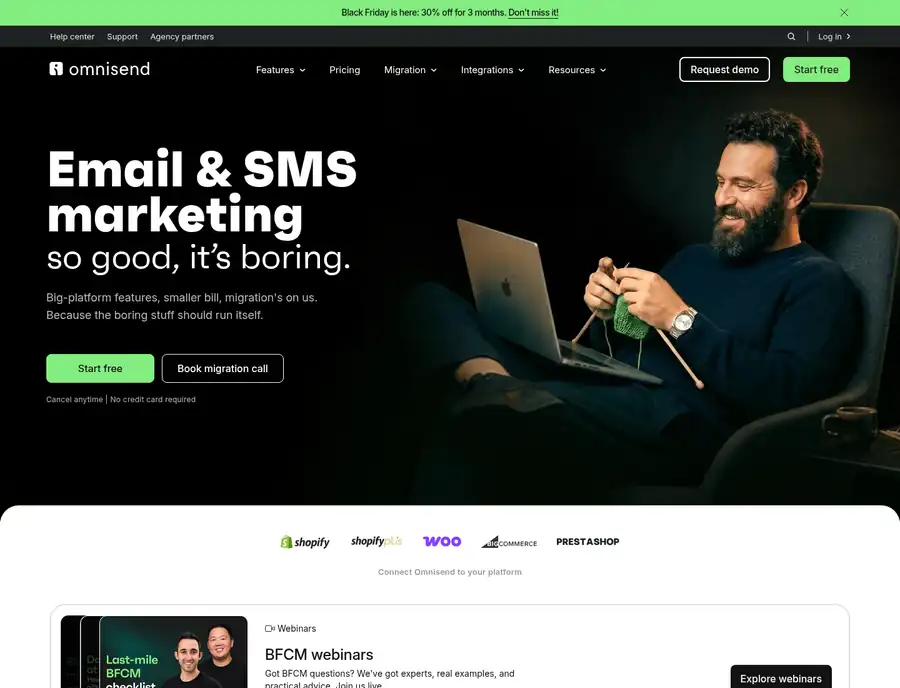
Key Takeaways From This Omnisend Review
- Omnisend is worth it in 2026 when you run an ecommerce store and will use campaigns plus automations in the same week.
- Omnisend pricing starts at $0 for the Free plan, $16 a month for Standard, and $59 a month for Pro, based on the official calculator in USD.
- The Free plan includes 500 emails, 500 web push notifications, and 250 contacts, with no credit card and no time limit.
- Standard email volume is your contact count times 12 each billing cycle. Pro email is unlimited, with a fair use cap of up to 60 times your list.
- New paid accounts can buy SMS only on Pro after May 4, 2026, and SMS credits are not included in the Pro fee. US rates run from $0.009 down to $0.007 per SMS.
- First-time paid users who pay three months upfront get 30% off those first three months: Standard at $11.20 a month and Pro at $41.30 a month, then regular monthly billing.
- I would skip a paid plan if I only needed a simple newsletter for a tiny list, and I would skip Pro until I truly needed unlimited email or SMS.
If that snapshot already matches how you sell, you can start on the Free plan and test the limits on your own store. I still want you to read the plan differences, because Standard and Pro look close until you see how SMS, email caps, and billable contacts work.
What Omnisend Is in 2026
Omnisend is an ecommerce marketing platform built around email, with SMS, web push, forms, automation, and reporting in the same account. The homepage presents it as email and SMS marketing for online stores, and the public integrations list includes Shopify, Shopify Plus, WooCommerce, WordPress, Wix, BigCommerce, Shoplazza, and Ecwid, plus a wider app market of 355+ connections.
I do not treat it as a generic newsletter box. The value, for me, is that a cart reminder, a welcome series, a post-purchase note, and a campaign can share the same contact profile and the same store data. That is the kind of setup a growing Shopify shop needs, especially when you look at how large the Shopify ecosystem has become in our Shopify statistics roundup, and how online retail keeps expanding in the ecommerce statistics list.
The current public plans are named Free, Standard, and Pro. There is also a Custom plan in the pricing page markup for businesses with custom needs or a very large list, but the calculator I used sells the three named tiers first. You may still hear people talk about older SMS rules on Standard. Those rules changed on May 4, 2026: new Free and Standard accounts cannot buy SMS, and Pro users add SMS as a paid credit pack.
Omnisend will not write your offer for you or guarantee a sales number. What it can do is give you a drag-and-drop email builder, pre-built ecommerce workflows, forms and popups, audience segments, and, on Pro, a way to add SMS and MMS beside those emails.
Who Omnisend Is For (and Who Can Skip It)
I recommend Omnisend to store owners who already sell on Shopify, WooCommerce, or a similar platform and want automations that use cart, order, and browse behavior. It also fits freelancers and small teams who want one login for campaigns, forms, and reports, with 24/7 support even on the Free plan.
I would stay on the Free plan if I were still learning the builder, collecting the first few hundred contacts, and sending only a light welcome or campaign schedule. I would move to Standard when I need more than 250 contacts or 500 emails a month, unlimited web push, and the option to remove the Omnisend badge from emails and forms.
I would skip a paid Omnisend plan if I only send a rare newsletter to a blog list and never use store automations. I would also skip Pro if I do not need SMS and my sending volume fits the Standard cap of contacts times 12. And if SMS is the whole reason I am shopping, I need to budget for Pro plus credits, not Standard.
Omnisend Features I Actually Care About
The official features page and the plan comparison on the Omnisend pricing site cover more tools than I would switch on in week one. These are the parts that decide whether I stay.
Email campaigns and the drag-and-drop builder
The email builder is a drag-and-drop editor. I can drop in text, images, buttons, and product blocks, pick a template, and add unique discount codes that sync with the store. There is also an image editor connected to Adobe Creative Cloud, plus AI help for subject lines and email copy in any language.
Campaign tools I care about on a normal week include scheduling in the subscriber’s timezone, email A/B tests on sender name and subject line, and Campaign Booster, which can resend a newsletter to people who did not open the first one. A custom domain signature (SPF and DKIM) is available so the store can send from its own domain. On the Free plan, emails carry a “Powered by Omnisend” badge. On Standard and Pro that badge is optional and can be removed.
Ecommerce automations
This is the feature I would miss first if I left. Omnisend lets me build automations that mix email, web push, and, on Pro, SMS in one workflow. Pre-built ecommerce workflows cover cart abandonment, a welcome series, post-purchase, and other re-engagement sequences. Order and shipping confirmation style flows are part of the email automation set.
The Free plan includes those pre-built ecommerce workflows, along with segmentation and A/B testing. Custom workflows, which use custom events and integration data, are a paid-plan addition. Automation splits and A/B split testing inside workflows are in the official comparison, so I can branch a flow instead of sending everyone the same path.
SMS, MMS, and web push
Web push is available on every plan: 500 notifications a month on Free, and unlimited on Standard and Pro. I like that I can add push to an automation beside email, without asking for a phone number.
SMS is a different story in 2026. If you started a paid Omnisend plan on or after May 4, 2026, you must be on Pro to buy an SMS credits subscription. SMS is not included in the Pro monthly fee. You add a credit pack, and Omnisend charges by volume and country. On the official US rate card, the rate is $0.009 per SMS at the low end, $0.0085 at a $50 a month spend (5,882 SMS in the pricing example), $0.008 at higher spend, and $0.007 at the top volume tier. MMS, which can include images or gifs, is limited to recipients in the US and Canada. Plain SMS is available globally.
Standard users who already had an active SMS credits subscription before May 4, 2026, can keep that legacy setup only while it stays active. If they change plans or cancel those credits, they cannot buy SMS again on Standard or Free. I treat that as a warning, not a loophole to plan around.
Forms, popups, landing pages, and list growth
I can build popups, embedded forms, teasers, flyouts, exit-intent forms, landing pages, and a Wheel of Fortune style prize form inside Omnisend. Forms can collect email, SMS opt-ins, and extra fields, with TCPA and GDPR consent options, custom timing, and page targeting. A/B testing and a countdown timer are available on forms. Social Capture can turn Instagram comments and DMs into email subscribers.
Active signup forms and additional fields are unlimited on all three plans. The Omnisend badge on forms is required on Free and optional on paid plans. Paid plans also add Forms AI, which can create the form design, copy, and visuals from a prompt. That is one of the clearer upgrades once I leave the Free plan.
Segmentation, reporting, and AI tools
Segmentation is unlimited on every plan and can use shopping history, engagement, and profile data. There are pre-built segments, customer lifecycle stages, contact profiles with browsing history, a live view of what visitors are looking at, and an AI Segment Builder that creates a segment from a plain-language prompt. Facebook Custom Audiences and Google Customer Match are listed as channel features for syncing those segments.
Reporting is where I check whether a campaign or automation actually produced sales. The official features set includes sales broken down by email, SMS, and push, plus opens, clicks, conversions, and deliverability signals such as bounces and unsubscribes. Omnisend’s own plan FAQ points to advanced reporting as one reason people pick Pro over Standard.
On the plan cards, Standard includes Omnisend Agent with 2 tools, and the official list names Agent: Forms and Agent: Chat. Pro includes Omnisend Agent Pro with 5 tools. The comparison table also lists Agent Pro tools such as dynamic content, a personalized product recommender, and personalized sending time. I will not pretend I need all five on a small store, but they are part of what you pay for on Pro.
Store integrations and support
The official site lists native connections for Shopify, Shopify Plus, Woo, Wix, and 355+ other tools, along with WordPress, WooCommerce, BigCommerce, Shoplazza, and Ecwid. That store sync is what feeds product blocks, discount codes, and abandoned cart data. If you run WordPress or WooCommerce, our WordPress statistics post is a useful snapshot of how large that ecosystem is.
Support is 24/7 on every plan, including Free, through in-app chat and support@omnisend.com. If you spend $400 a month or more on a Standard or Pro plan, Omnisend assigns a dedicated Account Expert for migration help, first automations, and ongoing guidance. Brands with more than 250 contacts can use the free Kickstart Migration service. The pricing page also advertises a 5-day free migration of automations, forms, segments, and templates.
Omnisend Pricing in 2026
I priced this review from the official Omnisend pricing page and the plan calculator, cross-checked with Omnisend’s 2026 pricing help article. All figures below are monthly USD and do not include VAT. Your tier can change automatically each billing cycle as billable contacts go up or down, and Omnisend says it emails you before an upgrade. You still have to confirm a plan change before it happens if you hit an email cap on Free or Standard.
| Plan | Monthly price | Emails per month | Contacts | Web push | SMS | Best for |
|---|---|---|---|---|---|---|
| Free | $0 | 500 | Up to 250 to send | 500 / month | No | Testing the product with no card |
| Standard | From $16 / mo | Contacts x 12 | Scales with your list | Unlimited | No, for new accounts after May 4, 2026 | Stores focused on email and push |
| Pro | From $59 / mo | Unlimited (fair use up to 60x list) | Scales with your list; $59 covers up to 2,500 | Unlimited | Add-on, from $0.007 / SMS | High-volume senders who need SMS |
The official calculator starts Standard at $16 a month. At a 0 to 250 list size, Standard includes 3,000 emails a month, which matches the contacts times 12 rule at 250 contacts. The plan card may still show a 500-contact label at that first slider position, but the email count is 3,000. At 251 to 500 contacts, Standard stays $16 and includes 6,000 emails. Pro is $59 a month from the first slider position through 2,500 contacts, which is why the Pro card shows 2,500 contacts even on a smaller list.
Here is a shorter view of regular monthly prices at a few list sizes from the official calculator. Standard email volume in this table is the official credits limit for that tier.
| List size | Standard / month | Standard emails / month | Pro / month |
|---|---|---|---|
| 0 to 250 | $16 | 3,000 | $59 |
| 251 to 500 | $16 | 6,000 | $59 |
| 501 to 1,000 | $20 | 12,000 | $59 |
| 1,001 to 1,500 | $25 | 18,000 | $59 |
| 1,501 to 2,000 | $30 | 24,000 | $59 |
| 2,001 to 2,500 | $44 | 30,000 | $59 |
| 2,501 to 3,000 | $50 | 36,000 | $70 |
| 5,001 to 5,500 | $88 | 66,000 | $105 |
| 10,001 to 10,500 | $150 | 126,000 | $170 |
| 25,001 to 26,000 | $288 | 312,000 | $425 |
| 50,001 to 55,000 | $450 | 660,000 | $784 |
| 100,001 to 105,000 | $988 | 1,260,000 | $1,392 |
The calculator continues above 100,000 contacts. At the 150,001+ tier I recorded, Standard is $1,508 a month and Pro is $1,940 a month. If your list or volume sits far outside those cards, Omnisend also describes a Custom plan for custom needs or a very large contact count. I did not invent a custom quote, because that is a sales conversation.
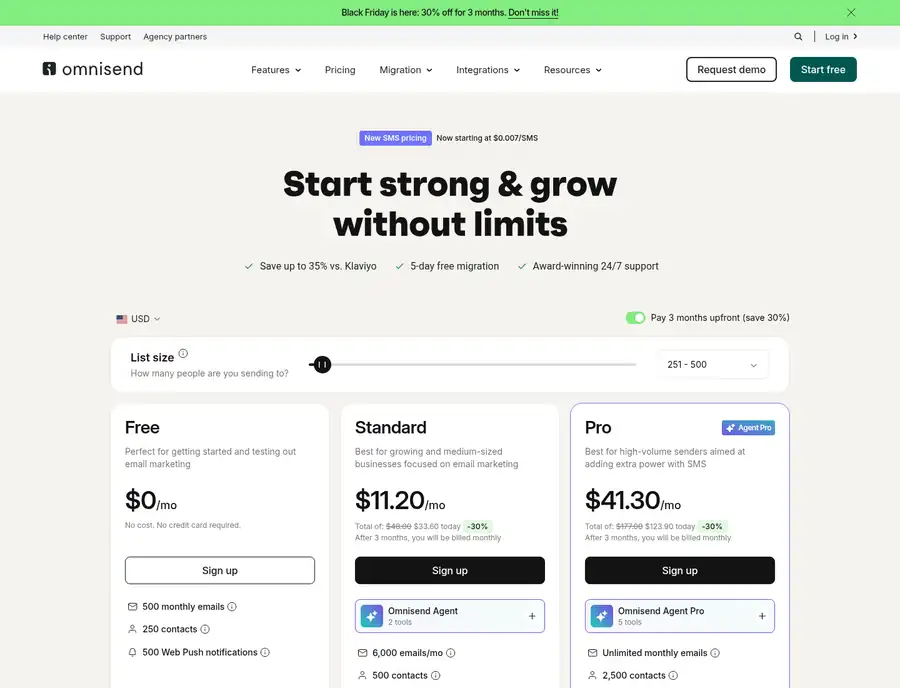
The 30% starter discount for new paid plans
Omnisend offers a starter discount when you subscribe to a paid plan for the first time and choose to pay three months upfront. You save 30% on those first three months only, and you can use it once. After that, billing goes back to the regular monthly price unless you pick another payment option.
- Standard: $11.20 a month instead of $16, or $33.60 today instead of $48 for the first three months.
- Pro: $41.30 a month instead of $59, or $123.90 today instead of $177 for the first three months.
- You turn this on by selecting “Pay 3 months upfront” during checkout. The official pricing page can show those discounted figures by default when the toggle is on.
When I opened the official pricing page, that three-month toggle was already on, so the cards showed $11.20 and $41.30 rather than $16 and $59. The help article treats this as a standing starter discount for first-time paid upgrades. The same 30% for three months can also appear as a site banner during a promotion. I would still do the math on the regular monthly price, because that is what you pay from month four.
Who counts as a billable contact
This is the part of Omnisend pricing that surprises people. You are billed for subscribers who opted in to email, SMS, or push, and for non-subscribers who still receive automated messages. That second group includes people who placed an order without checking the marketing box, abandoned a cart, browsed products, created a store account without subscribing, or were imported without an opt-in date. Only unsubscribers are left out of the billable total.
Non-subscribers cannot get marketing campaigns, but they can get automated, order-related messages, and those messages still count. A contact in more than one segment is not billed twice. A person subscribed to both email and SMS still counts as one billable contact. In practice, your billable total can be higher than your “subscribers” number, and your monthly price can rise as checkout and forms add people, even if opted-in marketing names stay flat. You can review the total under Audience, then Total billable contacts.
SMS credits, payments, and migration
On Pro, SMS is a separate subscription. There are no included SMS credits in the Pro fee. Rates depend on country and monthly SMS spend, and the public US tiers start at $0.009 and go down to $0.007 per message. The pricing page example I captured priced a $50 a month US pack at 5,882 SMS and $0.0085 per SMS. I would add that cost on top of $59 (or whatever Pro tier my list hits) before I call Pro cheap.
Omnisend accepts Visa (credit, debit, prepaid), Mastercard (credit, debit, prepaid), and American Express (credit, prepaid). Discover, Diners Club, JCB, and UnionPay are not supported. Charges are in USD.
I did not find a dated free trial of Standard or Pro on the official pricing page, so I am not going to invent one. The path Omnisend promotes is the Free plan with no credit card, plus a free migration of lists, segments, flows, and templates in a few days, described on the pricing page as a 5-day free migration. Kickstart Migration is offered to brands with more than 250 contacts.
Which Omnisend Plan Should You Buy?
I would use this simple split. If I am testing the builder, a welcome flow, and a popup on a new or tiny list, I stay on Free. If I am sending regular campaigns and automations to more than 250 contacts, and email is the main channel, I pay for Standard and watch the contacts times 12 email cap. If I send often, I need more than that cap, or I need SMS, I pay for Pro and add SMS credits only when I have a real text plan.
Two extra checks before I enter a card: first, count billable contacts, not just newsletter subscribers. Second, add the SMS credit pack if Pro is only useful to me with text messaging. If both of those numbers still look comfortable, the starter discount (three months upfront at 30% off) is a fair way to start a first paid plan.
Is Omnisend Worth It?
For an ecommerce store, yes, Omnisend is worth it in 2026 if you will use automations, not just a monthly blast. The Free plan is more usable than many “free” email tools because it includes pre-built ecommerce workflows, segmentation, A/B testing, popups, landing pages, and 24/7 support, with no card and no countdown to a forced upgrade. Standard at $16 a month is a reasonable jump once the list grows, as long as you accept the email cap and the lack of SMS for new accounts.
Pro is worth it when unlimited email or SMS is a real need, not a nice-to-have badge. At $59 a month for up to 2,500 contacts, the base fee is still clear. The bill gets harder to predict once you add SMS credits and once non-subscribers from checkout start sitting in the billable count. That is the main reason I would not call Omnisend automatically cheap at every list size.
I would not pick it if I wanted SMS on the cheapest paid plan, or if I expected only opted-in newsletter names to drive the invoice. In those cases the current rules will feel tight. For a Shopify or WooCommerce shop that wants email, push, and later SMS in one automation tool, the product still earns a place on my shortlist.
Omnisend Pros and Cons
Pros
- A real Free plan with 500 emails, 250 contacts, 500 web push notifications, no credit card, and no time limit
- Pre-built ecommerce automations for cart, welcome, and post-purchase, with email, push, and (on Pro) SMS in one workflow
- Official paid pricing starts at $16 a month for Standard and $59 a month for Pro, with a one-time 30% starter discount for three months upfront
- Shopify, WooCommerce, and other store connections, plus forms, popups, landing pages, and unlimited segmentation
- 24/7 support on every plan, a free migration path, and an Account Expert once you spend $400 a month
Cons
- New accounts can buy SMS only on Pro after May 4, 2026, and SMS credits are a separate add-on with no included messages
- Billable contacts include non-subscribers who receive automations, so the monthly price can rise even when marketing opt-ins stay flat
- Standard caps email at contacts times 12, which can feel tight if you send frequent campaigns
- Visa, Mastercard, and American Express are the accepted cards, and prices are charged in USD
If the pros match the way you sell and the cons feel manageable, the cleanest next step is the Free plan on your own store, then a paid upgrade only when a limit actually gets in the way.
Quick Links
Related reading on AffiliateBay if you want to keep going after this Omnisend review:
- Shopify statistics
- Shopify Affiliate Program Review
- ecommerce statistics
- WordPress statistics
- 30 Best Recurring Affiliate Programs
- 6 Best High Paying Affiliate Programs
- Affiliate Marketing Statistics
FAQs
Yes, if you run an ecommerce store and will use campaigns plus automations in a normal week. The Free plan is enough to test the builder and a couple of flows. I would pay for Standard once I outgrow 250 contacts or 500 emails. I would pay for Pro when I need unlimited email or SMS.
Omnisend pricing in 2026 starts at $0 for the Free plan, $16 a month for Standard, and $59 a month for Pro. Those paid starting prices are for the smallest list sizes on the official calculator. Standard is still $16 at 251 to 500 contacts, then $20 at 501 to 1,000 contacts. Pro stays $59 through 2,500 contacts, then $70 at 2,501 to 3,000 contacts. Prices are in USD and do not include VAT.
Yes. The Free plan costs $0 and needs no credit card. You can use it for an unlimited time, send 500 emails and 500 web push notifications a month, and reach up to 250 contacts. You can upload a larger list, but you need a segment of 250 contacts or fewer to send a campaign. The Omnisend badge stays on emails and forms until you upgrade.
The official pricing page does not list a dated free trial of the paid plans. What it does offer is the Free plan with no credit card, so you can try campaigns, forms, and pre-built automations before you pay. If you later buy Standard or Pro for the first time and pay three months upfront, Omnisend takes 30% off those first three months.
Stay on the Free plan while you test the product on a list of 250 contacts or fewer. Choose Standard if email and unlimited web push are the core need and you can work within the contacts times 12 email cap. Choose Pro if you send often, want unlimited email, or need SMS. Remember that SMS credits are a Pro add-on, not a bundle of included messages.
Yes, but only on Pro if you started a paid Omnisend plan on or after May 4, 2026. SMS is not included in the Pro monthly fee. You buy an SMS credits subscription, with US rates starting at $0.009 per SMS and falling as low as $0.007 per SMS at higher monthly spend. MMS with images or gifs is available for recipients in the US and Canada. SMS text is available globally. Legacy Standard users who already had an active SMS subscription before that date can keep that older setup only while it stays active.
Omnisend bills for subscribers who opted in to email, SMS, or push, and for non-subscribers who still receive automated messages, such as people who placed an order without accepting marketing, abandoned a cart, or were imported without an opt-in date. Unsubscribed contacts are not billed. A person who is in more than one segment, or who is subscribed to both email and SMS, still counts once. Your monthly tier can rise if checkout or forms add contacts, even when your subscriber count looks flat.
Yes. Omnisend connects with Shopify and Shopify Plus, plus WooCommerce, WordPress, Wix, BigCommerce, and many other store platforms. That store sync is what lets automations use cart, order, and browse data. If you sell on Shopify, that connection is one of the main reasons I would try Omnisend before a generic newsletter tool.
Is Omnisend worth it in 2026?
Yes, if you run an ecommerce store and will use campaigns plus automations in a normal week. The Free plan is enough to test the builder and a couple of flows. I would pay for Standard once I outgrow 250 contacts or 500 emails. I would pay for Pro when I need unlimited email or SMS.
How much does Omnisend cost?
Omnisend pricing in 2026 starts at $0 for the Free plan, $16 a month for Standard, and $59 a month for Pro. Those paid starting prices are for the smallest list sizes on the official calculator. Standard is still $16 at 251 to 500 contacts, then $20 at 501 to 1,000 contacts. Pro stays $59 through 2,500 contacts, then $70 at 2,501 to 3,000 contacts. Prices are in USD and do not include VAT.
Does Omnisend have a free plan?
Yes. The Free plan costs $0 and needs no credit card. You can use it for an unlimited time, send 500 emails and 500 web push notifications a month, and reach up to 250 contacts. You can upload a larger list, but you need a segment of 250 contacts or fewer to send a campaign. The Omnisend badge stays on emails and forms until you upgrade.
Does Omnisend have a free trial?
The official pricing page does not list a dated free trial of the paid plans. What it does offer is the Free plan with no credit card, so you can try campaigns, forms, and pre-built automations before you pay. If you later buy Standard or Pro for the first time and pay three months upfront, Omnisend takes 30% off those first three months.
Which Omnisend plan should I buy?
Stay on the Free plan while you test the product on a list of 250 contacts or fewer. Choose Standard if email and unlimited web push are the core need and you can work within the contacts times 12 email cap. Choose Pro if you send often, want unlimited email, or need SMS. Remember that SMS credits are a Pro add-on, not a bundle of included messages.
Can I send SMS with Omnisend?
Yes, but only on Pro if you started a paid Omnisend plan on or after May 4, 2026. SMS is not included in the Pro monthly fee. You buy an SMS credits subscription, with US rates starting at $0.009 per SMS and falling as low as $0.007 per SMS at higher monthly spend. MMS with images or gifs is available for recipients in the US and Canada. SMS text is available globally. Legacy Standard users who already had an active SMS subscription before that date can keep that older setup only while it stays active.
What counts as a billable contact in Omnisend?
Omnisend bills for subscribers who opted in to email, SMS, or push, and for non-subscribers who still receive automated messages, such as people who placed an order without accepting marketing, abandoned a cart, or were imported without an opt-in date. Unsubscribed contacts are not billed. A person who is in more than one segment, or who is subscribed to both email and SMS, still counts once. Your monthly tier can rise if checkout or forms add contacts, even when your subscriber count looks flat.
Does Omnisend work with Shopify?
Yes. Omnisend connects with Shopify and Shopify Plus, plus WooCommerce, WordPress, Wix, BigCommerce, and many other store platforms. That store sync is what lets automations use cart, order, and browse data. If you sell on Shopify, that connection is one of the main reasons I would try Omnisend before a generic newsletter tool.
Conclusion: Is Omnisend Worth It in 2026?
Omnisend is worth it in 2026 for ecommerce teams that want email, automations, and optional SMS in one place, with a Free plan that is actually usable. I would start free, move to Standard at $16 a month when the list or the email cap requires it, and reserve Pro at $59 a month for unlimited email or SMS. If that matches your store, you can try Omnisend on your own traffic and keep the bill honest by watching billable contacts, not just subscribers.